How FlutterFlow works
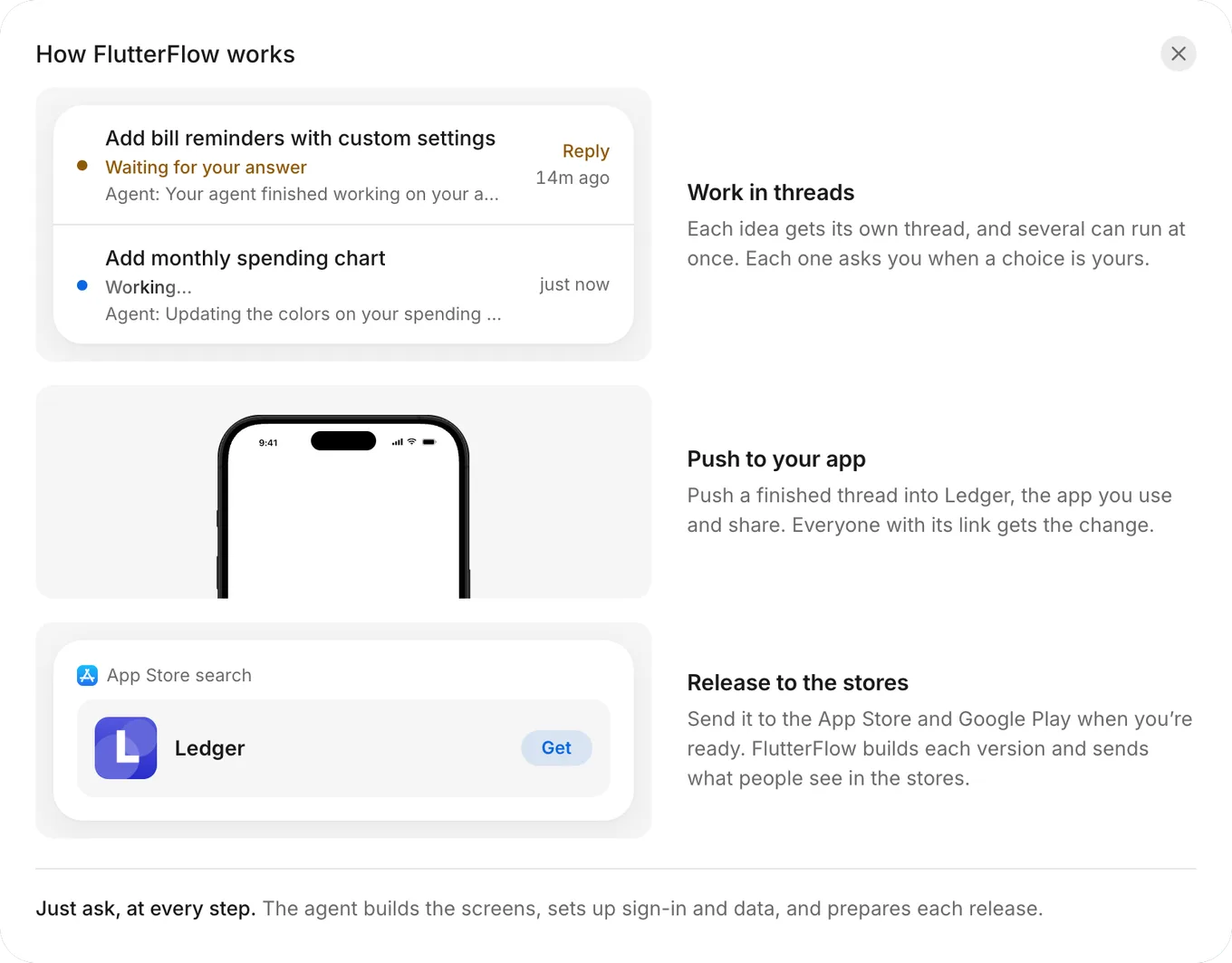
FlutterFlow is an app builder that you use by describing your app. You ask the agent for changes in threads, push the changes that you want into your app, and send your app to the App Store and Google Play when it’s ready.
Three steps
FlutterFlow organizes building an app into three steps. At each step, the agent can help: it builds the screens, sets up sign-in and data, and prepares each release.
- Work in threads. Start a thread for each idea. When a choice is yours, the thread stops and asks you.
- Push to your app. When a thread’s changes are ready, push them into the app you use and share. Everyone with your app’s link gets the changes.
- Release to the stores. When you’re ready, send your app to the App Store and Google Play.
To see these steps in FlutterFlow, open the account menu and click How FlutterFlow works.
Parts of FlutterFlow
Each part of FlutterFlow has a distinct job:
| Part | What it is | Learn more |
|---|---|---|
| Your app | What you build and what people use. Threads work on their own copies of it, and a push brings their changes in. | Find your way around |
| Prompt | Your description of the app that you want to build. The agent builds your first version from it. | Write a prompt |
| First version | The app that the agent builds from your prompt. FlutterFlow pushes it to your app for you. | Your first version |
| Thread | One conversation with the agent about one change, with its own copy of your app and its own data. | How threads work |
| The agent | Builds and changes your app in threads when you ask. | What the agent can do |
| Push | Moves a thread’s changes into your app when you click Push to your app. | Push |
| Backend | Everything your app keeps: tables and records, the people who sign in, files, secrets, starter data, and usage. | How the backend works |
| Share link | A link to your app, or to one thread’s version of it, that anyone with the link can open. | Share a link |
| Releases | Sends your app to testers and submits it for review in the App Store and Google Play through your own developer accounts. | How releasing works |
| Allowance | Your personal budget of agent work. The account menu shows how much remains and when it resets. | Plans, prices and allowance |
Your first version comes with a backend: a table for each kind of record your app shares or keeps across devices, filled with starter data, and sign-in with an email and password. When people can add pictures to a record, its sample pictures are saved in Backend › Files, along with the ones people add. To change any of this, ask the agent in a thread.
Key rules
These rules hold everywhere in FlutterFlow:
- A thread’s changes reach your app only when you push. FlutterFlow pushes your first version for you. Records you save in Backend update your app’s live data right away, without a push. See Push.
- Only a person can push. The agent can’t push on its own. After your first version, only the person who started the thread can push it, by clicking Push to your app and then Push. See Push.
- One push at a time. While one thread pushes, wait for it to finish before you push another. A thread that misses a newer push shows a card to bring that push in. See Multiple threads.
- A thread belongs to the person who started it. Owners, developers, and viewers can follow a thread as it runs, but only the person who started it can message the agent or push the thread. See How threads work.
- Allowance is personal. Your allowance belongs to your account, not to an app, so you share one allowance across every app that you build. See Plans, prices and allowance.
- Records, people, and secrets change in Backend, and setup changes in a thread. Owners and developers edit records, delete people who sign in, and add, edit, or delete secrets directly in Backend without a thread or a push. Saving a record updates live data for everyone using your app. If your app uses email and password sign-in, owners and developers can also add people in Backend. To change how tables, sign-in, or files work, ask in a thread and push the change. See How the backend works.
- Your app’s data has three copies. Live data is your app’s real data. Each thread has its own copy, and every new thread starts with starter data. See Live, thread and starter data.
- Push, share, and release do different jobs. A push updates your app. A share link lets people open your app. Releases sends versions of your app to testers and the stores. See Ways to run your app.
- Phone apps come from your app. FlutterFlow builds phone apps from your app, not from a thread, so a thread’s work reaches your phone apps and the stores only after you push it. See How releasing works.
- Some settings stay in your browser. Your browser, not your account, saves your theme and which guides you’ve seen. See Browser storage.